


UVIMate - UV Index Now
3.6145.00 Reviews
App Specs
- Version
- 5.1
- Updated On
- License
- Free
- Downloads
- 100,000+
- Developer
- Full Stack Cafe Pty Ltd
- Categories
- Weather
- Platform
- Android
Screenshots
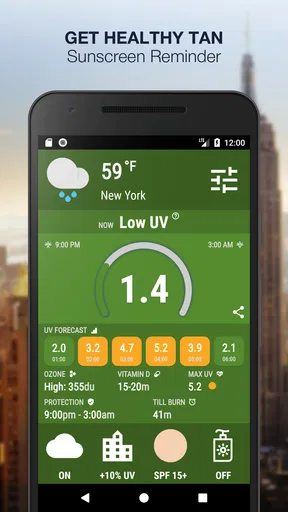
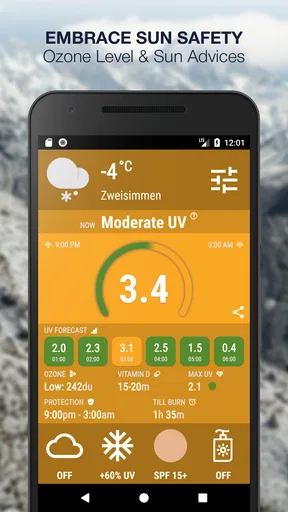
 Analysis by AppCompare
Most weather apps tell me whether to expect rain, wind, or heat. UVIMate takes a narrower but genuinely useful approach: it helps me judge how much ultraviolet exposure I may face and plan sun protection around that information. That focus makes it more practical than a general forecast when I am deciding whether a short walk, outdoor lunch, beach visit, or afternoon run needs more than casual preparation.
Developed by Full Stack Cafe Pty Ltd, this free weather app combines a global real-time UV index forecast with sun-safety guidance and a widget. It is available to everyone, supports devices running Android 4.4 or later, and has reached over 100 thousand installs. Its average rating sits at 3.6 from around 1.8 thousand ratings, which suggests a useful but not universally smooth experience. After using it as a focused sun-planning tool rather than a complete replacement for my normal weather service, I found that distinction important.
Why the UV forecast matters more than a normal weather icon
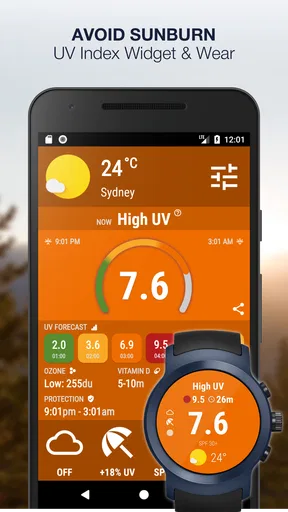
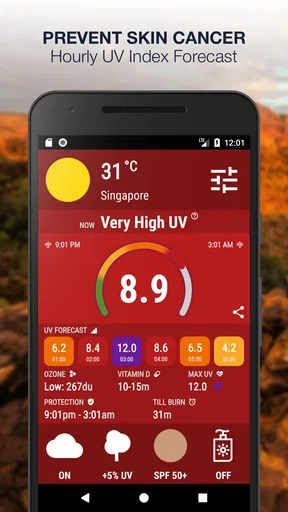
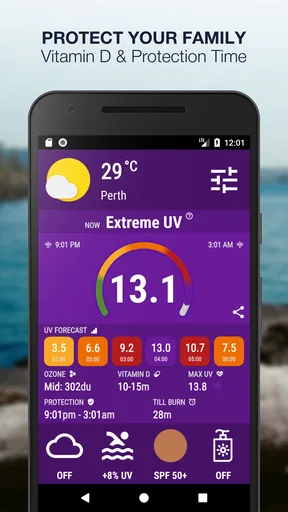
The app’s central capability is not simply showing a number. Its value comes from turning ultraviolet conditions into a decision I can act on. A sunny-looking day is not automatically the same as a high-exposure day, and a cloudy-looking day is not automatically safe. By placing the UV index at the center of the forecast, the app encourages me to think about sunscreen, shade, clothing, sunglasses, and timing instead of relying on temperature alone.
That is especially helpful because heat and UV exposure answer different questions. A mild day can still be uncomfortable for unprotected skin, while a hot day spent indoors may involve less direct exposure than its temperature suggests. I would not use this app to decide whether I need a jacket or whether a storm is approaching; I use it to answer the more specific question of how seriously I should take the sun during the hours ahead.
The sun-safety coach is the part that gives the forecast practical meaning. A raw index can be easy to ignore, particularly when I am busy or only going outside briefly. Guidance connected to the conditions makes the information easier to translate into behavior. For me, the strongest effect is that it changes sun protection from a vague seasonal habit into a time-sensitive choice.
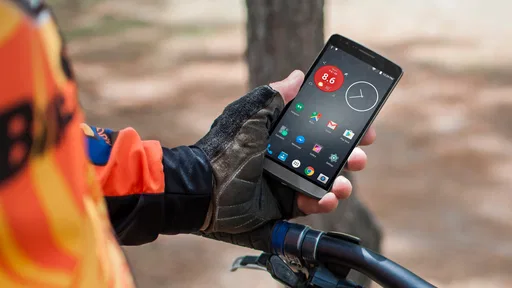
The widget also supports that purpose. A weather app that requires several taps can be forgotten, but a visible UV summary makes the information available during the moment I am deciding what to do. I found this more useful before leaving home than after arriving outdoors. Checking the widget while getting dressed can prompt me to pack sunscreen or choose a hat before the decision becomes inconvenient.
How I use the forecast during an ordinary day
My practical routine is simple. I check the current UV conditions in the morning, glance at the forecast before a longer outdoor activity, and use the safety guidance as a reminder rather than treating it as a medical instruction. If the day includes several separate trips outside, the forecast helps me think about cumulative exposure instead of judging each trip in isolation.
Worth Reading Before You Choose

EA SPORTS FC Mobile 26 Is a Bigger Football Game, but It Takes Time

Flipboard Shows What News Apps Must Do Beyond the Feed

Switching to Android Auto Means Rethinking Your Driving Routine

Google Calendar Makes a Crowded Week Easier to Manage

Ludo King Makes the Most of the Minutes Between Plans

Baby Panda World Brings Quick Play to Modern Phones, but Its Game Library Feels Busy
A realistic example is a weekend errand that turns into an outdoor lunch. I might leave home expecting to spend only ten minutes walking, then sit outside for an hour and walk back. A conventional weather app may tell me the temperature and chance of rain, but it may not make me reconsider sun protection. UVIMate makes that missing part of the plan more visible. I can apply sunscreen before leaving, carry it with me, or choose a shaded table instead of reacting after my skin already feels warm.
For exercise, the benefit is slightly different. I can use the forecast when choosing between an early run, a later run, or an indoor session. It does not replace judgment about heat, air quality, hydration, or personal health, but it adds a useful filter to the decision. Someone who normally checks only temperature may discover that the more comfortable-feeling time is not always the better time for reducing UV exposure.
The global focus is another practical strength. This is not an app designed around one city or one climate pattern. Whether I am at home, traveling, or planning an outdoor day somewhere unfamiliar, the purpose remains consistent: check the local UV outlook and adjust my preparation. That makes it more relevant to travelers than a sun-safety reminder tied to a single location.
Where the widget helps and where it does not
The widget is most useful when I treat it as a glanceable prompt. It can reduce the friction between remembering to check the UV index and actually checking it. I would place it where I already look before leaving, such as a home screen used for daily planning. The trade-off is that a widget is only helpful if it remains readable and current on the particular device. Screen layout, battery management, and personal home-screen habits can affect how convenient it feels.
I would not depend on a widget alone for a full outdoor plan. A quick glance cannot capture every factor that matters, and the forecast should be paired with common sense. If I am spending a long time outside, I still need to think about shade, clothing, water, sunscreen application, and breaks. The widget is best understood as an early warning and planning aid, not a substitute for broader weather information or personal care.
One useful workflow is to combine it with a regular weather app instead of forcing it to do everything. I can use my usual service for rain and temperature, then use UVIMate for the specific sun question. This division of labor is less frustrating than expecting a specialist app to become my complete weather dashboard. It also highlights the app’s main strength: focused information can be more actionable than a crowded screen full of unrelated forecast details.
The best scenario for this app
The people who gain the most are those who spend regular time outdoors and want a quick, repeatable sun-safety check. Parents planning playground visits, walkers, runners, cyclists, gardeners, outdoor workers, and travelers can all benefit from having the UV forecast close at hand. It is also useful for anyone who tends to underestimate exposure because the temperature feels pleasant.
Families may find the coach particularly helpful as a shared planning cue. Instead of telling children only that it is sunny, an adult can use the forecast to decide whether the outing needs extra shade, protective clothing, or more frequent breaks. The app does not perform that decision for me, but it makes the conversation easier to start.
Travel is another strong use case. When I am visiting a new place, I may understand the local temperature but not yet have a good instinct for how quickly outdoor exposure will become uncomfortable. A global UV forecast provides a consistent reference point. I can check before sightseeing, then adjust the day’s route or packing list without needing to learn a new local weather routine.
It can also help people who work in irregular outdoor patterns. A gardener or delivery worker may already know the weather forecast but still benefit from a dedicated UV reminder before a shift. The advantage is not complexity; it is repetition. A specialized prompt is easier to build into a routine than a general warning buried among many other conditions.
Trade-offs I noticed in daily use
The biggest limitation is the app’s narrow scope. If I want detailed rain radar, storm alerts, hourly wind information, pollen, or a broad travel forecast, I need another service. That is not a flaw in the UV focus itself, but it does mean the app may feel unnecessary to someone who already has a weather application with a clear UV section and a reliable widget.
The rating of 3.6 indicates that the experience has room for improvement. I would approach it as a useful specialist companion rather than a flawless authority. The current version is 5.1, and the app has been available since March 15, 2016, so it has had time to develop a distinct purpose. Even so, a long presence in an app store does not guarantee that every device, location, or user will find the interface equally convenient.
There is also a difference between seeing a forecast and acting on it. The app can remind me about sun safety, but it cannot make me reapply sunscreen, seek shade, or shorten an outing. Its success depends on whether I use the information before exposure rather than merely checking it afterward. That is why I think the widget and routine matter more than occasional curiosity-driven opening of the app.
The app is free to download, with in-app purchases ranging from $0.99 to $9.99 per item. I would therefore inspect the available options before assuming that every part of the experience is included at no cost. For a person who only wants an occasional UV check, the free starting point may be enough. Someone who wants to make the app part of a daily routine should consider whether any optional purchase adds value to that particular workflow.
The age rating is Everyone, which fits the straightforward nature of the tool. Still, an all-ages rating should not be confused with personal medical advice. Skin type, medication, location, altitude, reflective surfaces, and individual health circumstances can all affect how someone should manage sun exposure. I use the app as an awareness tool and keep those wider factors in mind.
Who should choose it over a general weather app
I would recommend it to a friend who repeatedly forgets about UV exposure until after spending time outdoors. It is also a good fit for someone who wants a dedicated glanceable reminder rather than a large weather dashboard. The focused presentation can be an advantage when the decision is specifically about sun protection, especially before exercise, outdoor work, or a family outing.
I would be less enthusiastic for a person who checks weather only once a week, rarely spends time outside, or already has a preferred weather app that presents UV conditions clearly at the right time. Adding another app creates value only when the dedicated focus changes behavior. If it becomes another unused icon, the broader service may be the better choice.
People who need highly detailed meteorological planning should also look elsewhere or use this alongside a more complete forecast. A sailor, hiker planning a demanding route, or traveler coordinating several weather-sensitive activities needs information beyond ultraviolet exposure. UVIMate can contribute one important piece, but it should not carry the whole planning job.
For me, the most convincing reason to keep it installed is the way it turns an overlooked detail into a visible daily decision. It does not need to replace my main weather app. It only needs to make me ask, before going outside, whether today’s sun calls for extra preparation. That is a modest role, but it is a useful one.
My final view after using it as a specialist tool
UVIMate works best when I treat it as a sun-exposure coach with weather context, not as an all-purpose forecast service. Its real-time UV focus, global outlook, guidance, and widget give it a clear identity, and the free entry point makes it easy to try. The strongest benefit is behavioral: the app puts UV information in front of me early enough to influence what I pack, when I go out, and whether I look for shade.
Its limitations are equally clear. The narrow feature set means I may still need a normal weather app, the middling average rating suggests the experience will not suit everyone, and optional purchases may matter depending on how I use it. It also cannot replace personal judgment or responsible sun protection.
My recommendation is therefore specific rather than universal: choose it if ultraviolet exposure is a regular concern and you want a dedicated reminder that fits into everyday planning. Skip it if your existing weather service already gives you the same information in a way you actually notice. For the right user, this is a practical little weather companion whose value comes less from showing another forecast and more from helping that forecast change a real decision.
Pros
- Clear UV index forecasts help plan outdoor activities safely.
- Provides sun protection recommendations based on current UV conditions.
- Location-based readings make local UV information easy to access.
- Simple interface allows quick checks without unnecessary features.
- Useful reminders can encourage regular sunscreen and shade breaks.
Cons
- Forecast accuracy may vary with location and changing weather conditions.
- Some features may require a premium subscription or in-app purchase.
- Frequent notifications could feel intrusive for users checking manually.
- UV readings alone cannot replace medical advice or personal sun sensitivity.
- Battery and location access may increase background resource usage.
FAQs for UVIMate - UV Index Now
What is UVIMate - UV Index Now used for?
UVIMate - UV Index Now is designed to help you understand the current ultraviolet radiation level in your location and plan outdoor activities more safely. It presents the UV Index in a simple format, usually with color or risk categories, and may provide guidance about sunscreen, protective clothing, shade, and suitable times to go outside.
How accurate is the UV information provided by UVIMate?
The app’s UV readings depend on location data, weather information, and the forecasting service used by the application. It should be treated as helpful guidance rather than a medical or scientific guarantee. Local conditions such as altitude, cloud cover, reflection from water or snow, and rapidly changing weather can affect actual exposure, so users should also follow official health and weather advice.
Does UVIMate require location access to work?
UVIMate can provide the most relevant UV Index information when it knows your current location. Depending on the device and app configuration, this may require permission to access location services. Users who prefer not to grant location access may need to enter a place manually, if that option is available, although forecasts may be less convenient when traveling or moving between locations.
Can UVIMate send notifications or reminders about high UV levels?
UVIMate may include alerts, notifications, or daily UV forecasts to warn you when ultraviolet exposure is expected to be high. Availability can vary according to the app version, operating system, subscription status, and notification permissions. Before relying on reminders, check the app’s settings and make sure notifications, location access, and background activity are enabled on your Android or iOS device.
Is UVIMate suitable for children or people with sensitive skin?
UVIMate can be useful for families and people who are especially concerned about sun exposure, but it does not replace professional medical advice. Children, people with very fair or sensitive skin, and users taking medication that increases sun sensitivity may need additional protection even when the displayed risk appears moderate. Use sunscreen correctly, wear protective clothing, seek shade, and consult a healthcare professional when necessary.


